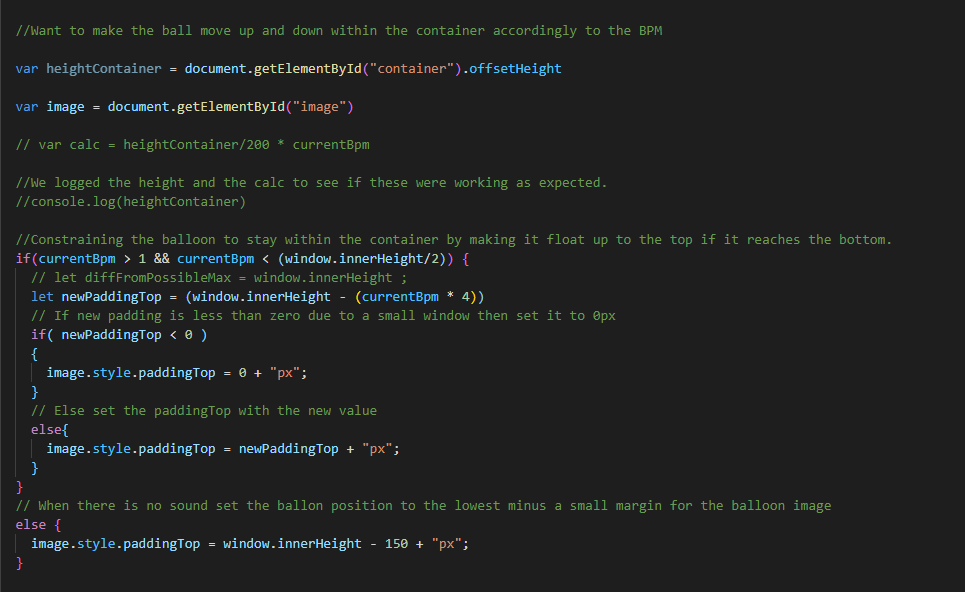
This week I got the balloon to move from down to up as it is more logical considering that it is based on low to high BPM. As we moved forward towards an object that has its own integrity.
The code that I used was the following:
The aim of this week is to work on finalizing the example and working towards the show and tell. We aim to make the example have more integrity. The first thing we wanted to change from the balloon example was that the balloon has its own preconceived notions which might affect how it is viewed so we decided to turn it to a more of an abstract object as could be seen below. We decide to only show a few examples and not all since the were some overlaps and some that were not as useful after executing the experiment. We chose to present examples Balloon 1 and 2, rectangle example 1 and 2 which you could see the insights of below as well as insights for the experiments that we did not present which we both wrote in a google shared document.
You can see this idea that we landed on at the end of controllable vs affectable where in the affectable, the rectangle has a life of its own where it doesn’t just go back like a controller which was an interesting since if we had more time in this project we would have worked more on it as it had more of a nuance.
Below you can see the shared google doc where we listed down the intentions, experiences, insights, questions, and what importance for designers of each example at the Show and Tell. (Al-Eryani & Isaksson, 2020)
Balloon example 1 (Only BPM, stepwise, no transition) –
Intentions:
- How would the interaction be where there is a continuous input of sounds?
- How would the experience of
- How would the interaction feel if a balloon responded to BPM by placing itself on a vertical axis?
Experience:
- It was more logical to understand where you would get what place the Balloon is based on the positioning on the screen. (Top right corner: 0 BPM and bottom right corner: 170 BPM)
- It became less like a game and more like a visualisation of the BPM data of your input sound. It does not take into account what type of sound input it is presented with. It could be clapping, speaking, writing on a keyboard etc. The output is still the same, placing itself on a vertical axis depending on the amount of BPM.
- It felt like a secure way of knowing what BPM your sound input had since there was no smooth transition between the positions of the vertical axis. It was either one or the other.
- Other than the delay of when you stop the sound input it felt very instant in showing the current BPM.
Questions to explore:
- How would a more fluid interaction feel like?
Insights:
- The value of a continuous input of sound
- How a the use of a display where the target object is always displayed rather than targeted
How is it beneficial for designers:
- A continuous sound input gave more of a secure feeling where the it displays if it’s high or low BPM
- A way of visualising BPM data of sound inputs
Attributes: Stepwise, instant?
Balloon example 2 (Only BPM, fluid, smooth transition) –
Intentions:
- How would a more fluid movement of an object be perceived? What is the main difference within the interaction?
Experience:
- It was a more visually pleasing interaction where the balloon wouldn’t be as jumpy as the first example. By implementing a transition “ease-in-out” it was less jumpy as the balloon transitioned smoothly between the different values.
- It felt more like a fluent visualisation of data. How the value of BPM goes up and down continually.
- Also feels accurate somehow, the BPM might not always be set on one value or the other, it can also move between values.
Questions to explore:
- How would the implementation of frequency change the experience?
- What if the output was more nuanced and took into account what type of sound it was presented with?
Insights:
- It matters if the BPM continually changes, because it will transition more smoothly between values.
How is this beneficial for other designers:
- Visually pleasing with smooth transitions
- Still feels like a visualisation of BPM data, maybe more suitable for input that changes continually than having a constant input type (such as always keeping 100 BPM for example) (constant – inconstant)
Rectangle example 1 – (BPM and Freq, controllable) Object is merely mirroring the inputs
Intentions:
- How would it feel like to interact with something that visualises the data you put in the form of BPM and decibels in frequency bin 144?
- How would it feel like to interact with something that is completely controlled by your inputs (ie no own integrity of the object).
- What if the output was more nuanced and took into account what type of sound it was presented with?
- What if what type of input mattered to control the object? (adding frequency to BPM)
Experience:
- It feels like instant interaction (except for the delay of the BPM). You can exactly see what your inputs are doing to the object.
- It reminds me of the example of how you write on your keyboard. It doesn’t matter if you type aggressively or calmly, the output will be the same (the letters you press will appear on the screen). That’s what it felt like with having only the BPM axis, then the decibels in frequency bin 144 input didn’t matter. But adding the code that took the decibels of frequency bin 144 into account, the output became more nuanced – showing different outputs for different inputs.
Questions to explore:
- How would it be if the object becomes more lively/has its own integrity?
Insights:
- By having a Rectangle it became more of an abstract and non limiting of what it could be since a balloon has it set preconceived notions.
- When the output became more nuanced in the way that it shows both BPM data and decibels of frequency bin 144 data it allowed for more skillful interaction. Now it matters what type of sound you make, because that controls where the object places itself on the page.
- It became more of a uniform (interaction attributes) as it became more controllable and influenced by intuition.
How is it beneficial for designers:
- It became more focused as we became more controllable as the idea became more converged, as well as having an object that doesn’t have preconceived notions.
- It became more nuanced as a more skillful interaction was displayed.
Rectangle example 2 – (BPM and Freq, affectable) Object has its own integrity
Intentions:
- How would it feel like to interact with something that has its own kind of “will”, its own integrity?
- How would it feel like to only “affect” the object with inputs rather than control it?
Experience:
- Feels “mutual”. Like the one making the input and the object are two individuals somehow.
- Feels like the object has an agenda as well, it’s not just the “input-maker”.
- Much less controllable.
- It takes adaptation of the input to be able to steer the object to where you want it. You need to seize input and wait in order for it to go backwards, unlike the “controllable” example where it shoots right back when input has seized.
- Reminds me of when you’re biking uphill and you hop off because it’s easier to “carry” the bike than to sit on it, because you have your feet on the ground that’s a force that challenges the force of the wheels to go backwards. Our object has a force of its own to go slowly back, you can’t make it go back faster.
Questions to explore:
How is it beneficial for designers:
- By changing it and by it having more integrity it would mean that the interaction becomes more mutual.
These are the examples that we did not present:
Ball example (targeted) –
Intentions:
- How would an interaction where only if a certain BPM is reached an image appears?
- How would the experience be if you have to aim at clapping in a 100 BPM?
Experience:
- It became a challenging experience as we needed to reach a 100 BPM to show the image of the ball. It felt like a game, you felt a sense of achievement when you finally got the ball to show itself on the page.
- As a way to guide the 100 BPM we had a headphone with a 100 BPM metronome as a guiding mechanism. With the help it was less challenging, but still challenging enough to get a feeling of achievement when the ball showed. Without the help it was very challenging and it became almost coincidental. It’s hard to know at what BPM you’re clapping, and you got no help from the object since it only revealed itself at 100 BPM and was otherwise hidden.
Questions to explore:
- How would it be if we had another object where we wouldn’t need to be a targeted interaction but a continuous sound input where it would react to the BPM?
Insights:
- It was a challenging interaction which needed attention to reach the favoured outcome (targeted interaction attribute definition: Appreciation, significance of interaction, worthy of attention, high challenge, high concentration, room for competence).
- It allows for developing a skill, you can get better at knowing how to clap in 100 BPM if you get more and more familiar with the sketch.
How is it beneficial for designers:
- Would an action like this be useful to implement?
- Inconvenience? Challenging? Gaming-purposes?
Claim that draws on the body
Attributes: Targeted
Balloon example (BPM and Freq) –
Intentions:
- How would the example be like where the horizontal axis be related to high and low decibels of frequency in bin 144?
- How can it be described through the interaction aesthetic attributes?
- What if the output was more nuanced and took into account what type of sound it was presented with?
Experience:
- It became more informative as
- The output is more nuanced due to the object responding differently to BPM input than to decibels of frequency bin 144 input. What type of sound input matters.
Questions to explore:
- How would a more controlled experience be reached?
Insights:
- It became more of a stimulating task (Psychology needs) as it became more exciting and playful to use.
- It became more interesting as two different information data are visualized
How is this beneficial for designers:
- by turning it into a graph like with two different data points as the interaction is based on the audio input it becomes more stimulating, direct and nuanced
Attributes: Precise, Direct
Show and Tell
Exploring & understanding the nuance of input and output
- Balloon example BPM
- This example shows the visualization of different Bpm levels where the balloon moves vertically
- Understanding how different output affect the experience (stepwise – fluent)
- Top left – corresponds to low/ 0 BPM
- Bottom left – corresponds to high Bpm 170 bpm
- Stepwise sketch more suitable for when the purpose is to keep a steady BPM, fluent more visually pleasing and suitable for when the BPM is continually changing.
- Questions we wanted to explore:
- How would the implementation of frequency change the experience? Does
- What if the output was more nuanced and took into account what type of sound it was presented with?
We wanted to explore what would happen to the interaction if the object reacted to more than one type of input, so we brought in frequency as a factor:
- Rectangle examples (changed from balloon to rectangle because it’s more ambiguous and lacks preconceived ideas about how it’s supposed to behave) (also changed the BPM axis to start from the bottom and go up)
- It’s moving in different directions regarding the type of input, BPM on a vertical axis and frequency on a horizontal axis. Nuance in output because it’s responding to the nuance of input.
This led to us trying to explore how can the object become more lively/have it’s own integrity?
- Controllable vs resisting, sketch #1 is only mirroring the inputs whereas sketch #2 is displaying an object that gets affected by the inputs but has its own agenda (to go slowly back when input has seized).
- Sketch #2 demands the “input-maker” to be able to adapt to the object’s integrity to move it in ways the “input-maker” wants to.
Conclude with:
The contrasts between fully controlling an object and only being able to affect it, interesting because:
- It makes the interaction more organic (like a bike is resisting an uphill ride – our object is resisting going back to the start).
- It gives the object a character, more personified (own agendas, own logic etc)
- It’s something that you can develop a skillful coping with. Learn how the object responds to different types of inputs and adapt your inputs to make it suit yourself.
If more time/competence we would like to explore more ways to include integrity in an object because:
- It’s a different type of interaction than what we’re used to, i.e. the cursor always following your inputs, it’s not resisting.
Feedback from the Show and Tell:
- We were told to be more critical when doing the experiments where we ask if we are achieving what we are aiming to do.
- We need to pay more attention to when there is discrepancy when we are showing and telling match.
- How does the speed/curves movement affect the object which is a point of further exploration
- Undermines own work if you don’t push on what you want to do vs what it’s actually showing
More genral feedback during the end of the session:
- By exploring a theme it means that there is success criteria to think of during each experiment.
- Tweaking the parameter to push the experience
- Exploring different inputs (Although we did discuss having audio as an input and output but we were told it would difficult to get it to work smoothly )
- We didn’t stray away from screen based + color based output
These are some great thing to think about during module 2, while this was the first kind of Show and Tell that we’ve down it becomes more clear what is expected of us in the upcoming ones. We also tried to tie everything together in the end which we could of done better as well as reflect more in real time. Another point would be to work more on being critical of each thing we’ve done so we can bring it up in the show and tell where things don’t work as intended as an example. Overall there was a lot to gain from this module to use to the other modules for a better outcome.

